Date Picker
The Date Picker is a form control that allows a date to be selected from an interactive calendar.
The Date Picker appears on a user form as in the image below:

When the user hovers over the control the outline color will change as in the image below:

Once the Date Picker is selected the calendar will pop out from the control, as in the image below:
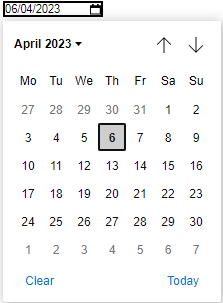
Once a date is selected from the calendar this will be the value of the control.
Properties
Color Properties
When applying any color property please see the advice given for using Web Safe Colors below.
Appearance
Appearance - Border
Appearance - Caption
- Caption
Controls the control's caption.
The text displayed in this property can have formatting tags applied to decorate parts of the text string, see Formatting the Displayed Text below for more information.
- Caption Color
Controls the caption color of the control.
- Caption Font
Determines the font used for the controls caption.
- Caption Horizontal Alignment
Controls whether the text inside the caption is horizontally aligned to the left, right or center
Appearance - Text
- Font
Specifies the font of the text shown in the control.
- Text Color
Specifies the color of the control's text.
- Text Color (Disabled)
Specifies the color of the control's text when the control is disabled.
- Text Color (Hover)
Specifies the color of the control's text when the control is in a hovered state.
- Text Horizontal Alignment
Controls whether the text is horizontally aligned to the left, right or center
Behavior
- Date
Specifies the selected date in the control.
- Date (Override Rule)
Specifies the selected date in the control.
- Date Format
How the date value for this control should be formatted.
- Default Value
Controls the default value of the control. If the default value is based on a rule and the value
changes, then the value of the control will be changed to be the new default value.
- Enabled
Controls whether the control is enabled (if the result is TRUE) or disabled (if the result is
anything other than TRUE, e.g. FALSE).
- Error Result
Determines whether the value of the control is in error. The result of this rule is a string
containing the error message if the value is in error, otherwise a blank string or the number zero.
- Hide On Date Selection
Specifies whether or not to hide the date picker pop- up when a date is selected.
- Maximum
The maximum value that can be selected on the control.
- Minimum
The minimum value that can be selected on the control.
- Tab Index
Configures the position of the control in the form tab order.
- Visible
Determines whether the control is visible (TRUE) or hidden (FALSE).
Events
General
- (Metadata)
Optional text which can be used to provide information belonging to or about a control. For example,
a list of CSS classes which can be parsed and applied to the control using the Integration Theme in
DriveWorks Live. This doesn't affect the control's behavior.
- (Name)
The name of the control
- (Tag)
Optional text which can be used to describe the control, but which doesn't affect the control's
behavior.
- Tooltip Duration
Controls the duration, in seconds, for which the tooltip will remain visible. Values of 0 and below
indicate an infinite duration.
- Tooltip Text
Specifies the text to display in a tooltip when hovering over the control.
The text displayed in this property can have formatting tags applied to decorate parts of the text string, see Formatting the Displayed Text below for more information.
Layout
- Caption Width
Controls the width of the control's caption.
- Height
Controls the height of the control.
- Left
Controls the left position of the control.
- Top
Controls the top position of the control.
- Width
Controls the width of the control.
Web Safe Colors
When selecting a color, we strongly recommend using colors selected only from the Web or Custom tabs, or manually entering as a hexadecimal value (for example #000000 for black).
Named colors selected from the System tab (for example ControlText) are very unreliable.
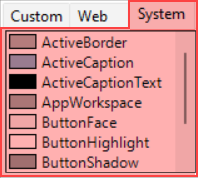
System colors will vary per browser, and/or the user's chosen color scheme.
System colors were deprecated in CSS 2.1, and should be avoided.
Default Property values previously using System colors (for example ControlText) were replaced with safe alternatives in DriveWorks 22.0.
New Controls made from this version onwards will no longer use System colors by default.
Existing Controls created before this version will use the old defaults, we suggest existing controls that use System colors are replaced with alternative web safe values.
For example:
ControlText → Black
Formatting the Displayed Text
Formatting Text
The text displayed in the Caption and Tooltip Text property support the use of formatting tags to format parts of the text string.
The supported tags are:
- Bold
- Italic
- Underline
- Color
- Url (not supported for Tooltip Text)
See How To: Format Text for more information.